What You're Actually Downloading When You Want the App
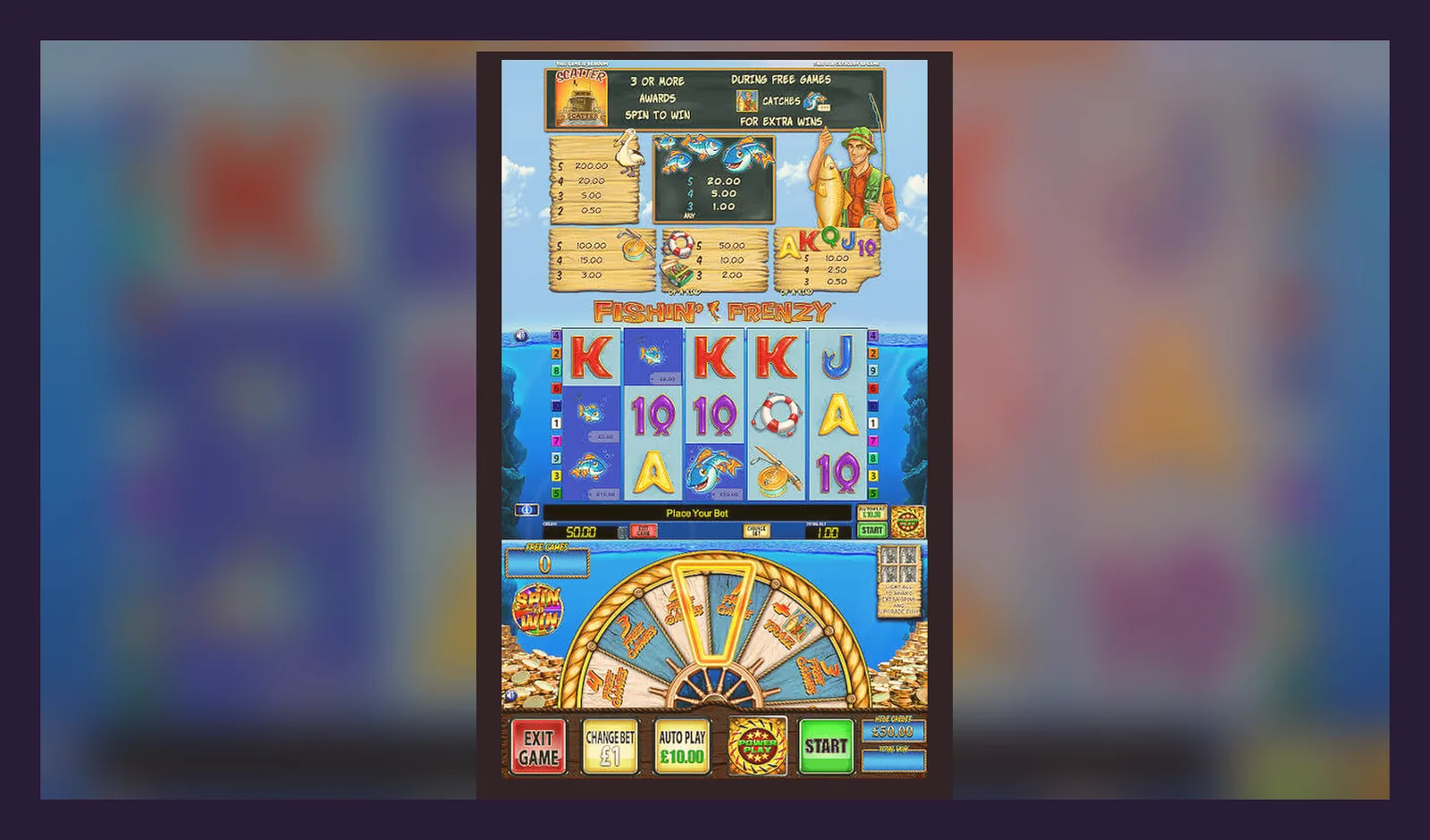
Here's what's broken about the «app» question: Fishin Frenzy isn't a standalone app you download from Google Play or the App Store. It's a browser-based slot that lives inside casino operators' sites or their apps — and most of the time, adding it to your home screen is just a bookmark with a nicer icon.
That distinction matters when you're searching for an APK or wondering why you can't find «Fishin Frenzy» in the store. This page walks through what you actually get, how each install path works, what the fake clones look like, and which questions land in operator support most often. Every detail here reflects how the UK market runs: UKGC licensing, GAMSTOP integration, £5 and £2 stake caps by age, and the fact that your first withdrawal takes 24–48 hours for document checks.
The Store-Style Card You Won't Find in Any Store
If Fishin Frenzy were packaged as a standalone app, the listing would look like this. Use these specs to spot inconsistencies when a third-party site claims to host the «official» version.
That rating and download count are illustrative — Blueprint doesn't publish a single-game app. The real game runs on HTML5 canvas inside the operator's platform, so the «app» is either the operator's native app or a progressive web app (PWA) that wraps the casino site. If someone offers you a 47 MB APK with «Fishin Frenzy» in the title and no operator branding, it's not the original.
Four Install Paths and What Each One Actually Does
Support gets these questions daily: «Where's the app?» and «Is the APK safe?» The answer depends on which path you take. Here's every option, step-by-step, with the risk profile of each.
- Browser play (Chrome, Safari, Firefox on mobile): Open the operator's UKGC-licensed site, log in, search «Fishin Frenzy» in the game lobby, tap the tile. The game loads in the browser window. No install, no storage used, no permissions asked. Risk: zero, assuming you've verified the operator's licence number in the footer matches the UKGC public register. This is the default for most UK players.
- Add to home screen (PWA shortcut): While the game or lobby is open in your mobile browser, tap the browser menu (three dots or share icon), select «Add to Home Screen» (Android) or «Add to Home Screen» via the share sheet (iOS). You'll see a new icon on your home screen that opens the site in a chromeless browser window. It's still a bookmark — no offline play, no separate install. Risk: none, but the icon won't work if the site goes down or your login expires.
- Operator's native app (Google Play / App Store): Search the operator's brand name in the store, download their official casino app (e.g., Sky Bet, Paddy Power, Grosvenor). Log in, navigate to slots, find Fishin Frenzy. The game streams inside the app shell. Permissions: location (for geofencing), storage, notifications. Size: 30–80 MB. Risk: low if it's the real operator app; the UKGC licence still applies. Fake operator clones do exist — check the developer name matches the licence holder.
- Third-party APK (sideload from unknown source): Someone offers a .apk file from a forum, Telegram group, or mirror site. You enable «Install unknown apps» in Android settings, download the file, install it. Risk: high. The file could be a repackaged casino app with injected malware, a phishing wrapper that steals login credentials, or a fake game with rigged RNG and no real payout. Even if it looks identical, it's not connected to a licensed operator, so your balance and documents are in someone else's hands. The UKGC won't help you recover funds lost to an unlicensed app.
What the Screens Look Like and What You Can Actually Do
Whether you're in a browser, a PWA shortcut, or an operator app, the Fishin Frenzy interface is consistent. Here's what you see and what each screen controls.
- Lobby entry: A tile or card with the Fishin Frenzy logo, usually tagged «Blueprint Gaming» or «Jackpot» if there's a progressive pool attached. Tap it and the game loads in full-screen or near-full-screen, depending on the operator's UI wrapper. Load time: 2–5 seconds on 4G, faster on Wi-Fi.
- Main reel screen: Five reels, three rows, ten fixed paylines. The bet selector sits bottom-left (£0.10 to £5.00 per spin, or £0.10 to £2.00 if you're 18–24 and the operator enforces the lower cap). Autoplay, turbo mode, and paytable buttons sit along the bottom bar. Your balance and current bet are top-left; the spin button is bottom-right. The background is underwater blue with cartoon fish and a fisherman on the left. No settings for RNG or volatility — those are locked server-side.
- Free spins screen: When you land three or more scatter symbols (the fisherman), the screen transitions to the free-spins bonus. You get ten spins with a prize catch feature: every fish symbol collects a random multiplier, and the fisherman collects them all at the end. This is where the big wins happen, but it's also where variance bites — you can run ten spins and collect £0.80 total if the fish don't land. The maths doesn't change because you're on mobile.
- Paytable and info screen: Tap the «i» icon to see the full paytable, RTP (usually 96.00% or 95.00%, depending on the operator's config), max win (up to 5,000× stake), and the rules for the free-spins feature. This screen also shows the game version number and the provider logo. If those details are missing or the RTP is listed as 99.8%, you're not looking at the real game.
- Account and deposit overlay: Tap your balance or the top-right menu to see deposit options (debit card, PayPal, Apple Pay, Trustly, paysafecard — no credit cards since the 2020 ban), transaction history, and responsible gambling tools (deposit limits, session reminders, self-exclusion via GAMSTOP). The first deposit triggers age and identity checks; some operators ask for documents immediately, others let you play and ask before the first withdrawal. Budget 24–48 hours for KYC clearance.
None of these screens change whether you're in a browser or an app. The operator's wrapper might add a navigation bar or a quick-deposit button, but the core game is identical.
Phone Requirements: What Actually Runs It and What Doesn't
Fishin Frenzy is an HTML5 slot, so it runs wherever modern web standards are supported. That covers almost everything made after 2018, but here's where the edges get rough.
- Operating system: Android 8.0 or later, iOS 13 or later. Older versions might load the game but stutter during animations or fail to register taps on the spin button. If your phone predates 2019, test in demo mode first (where available) before depositing.
- Browser: Chrome 90+, Safari 13+, Firefox 88+, Samsung Internet 14+. Edge works on Android. Opera and Brave are hit-or-miss — some operators block them to prevent ad-blocker interference with tracking pixels. If the game won't load, try Chrome or Safari.
- Screen size: Minimum 4.7 inches diagonal (iPhone SE size). The UI scales down, but anything smaller makes the bet selector buttons too cramped to tap accurately. Tablets work fine; the game doesn't reflow to landscape on all of them, so you might see black bars on the sides.
- Connection: 3 Mbps minimum for smooth spins, 5 Mbps recommended. The game streams textures and sound on the fly, so a weak signal causes frame drops and delayed spin results. If you're on the train and the reels freeze mid-spin, that's a connection issue, not a rigged game — the result was determined server-side before the animation started.
- Storage: If you're using a PWA shortcut, it caches 5–15 MB of assets (logo, paytable images, sound files). Native operator apps need 30–80 MB plus space for login tokens and transaction logs. Browser play uses negligible storage.
What This Version Actually Added (and What It Didn't)
Blueprint Gaming doesn't publish per-game changelogs, but operator platforms update the game client every few months. Version 2.1.8, deployed in December 2025 across most UK sites, brought three changes:
- Faster load time on 4G: The initial asset bundle dropped from 8 MB to 6 MB by switching fish sprites to WebP format and pre-loading only the base game screen. Free-spins assets load on-demand when you trigger the feature. Practical impact: the lobby-to-reels wait dropped from 4 seconds to 2.5 seconds on a mid-range connection.
- Stake-cap enforcement for 18–24 players: Operators now pull age from KYC data and hard-cap the bet selector at £2.00 per spin if you're under 25. Before this update, some sites relied on honesty prompts; now it's baked into the game client. You'll see a tooltip explaining the cap the first time you open the bet panel.
- Auto-pause after 60 minutes: A new responsible gambling feature mandated by the UKGC: if you've been spinning for an hour straight, the game pauses and shows a summary of spins, total wagered, and net result. You can resume immediately, but the intent is to surface the clock. Some players find it annoying; others credit it with stopping a chase-loss spiral.
What didn't change: RTP, volatility, max win, paytable, free-spins frequency, or the underlying maths. If a site claims «new version with better payouts,» that's a red flag — the game's maths is certified and doesn't shift between updates.
How to Spot a Fake Clone Before You Hand Over a Deposit
Fake Fishin Frenzy apps and sites exist because the game's branding is recognisable and search volume is high. Here's what the clones get wrong and which details confirm you're looking at the real thing.
- Missing UKGC licence: The genuine game only appears on sites that hold a UKGC remote gambling licence. Check the footer for the licence number (format: 000-000000-R-000000-000) and look it up in the UKGC public register. If there's no licence or the number doesn't match, close the tab. No exceptions.
- Developer name mismatch: The real game credits Blueprint Gaming (or Blueprint in the paytable screen). Clones often say «Fishin Frenzy Ltd» or leave the provider field blank. If the developer isn't Blueprint, it's not the original.
- Implausible RTP: The certified versions run at 96.00% or 95.00% RTP (the operator picks the config). Clones advertise 99.5% or «highest RTP in the UK» to lure deposits. No regulated slot in the UK runs above 98%, and Blueprint doesn't offer a 99% config for Fishin Frenzy.
- Offline play or modded features: If the app claims «play without internet» or «unlock free spins any time,» it's not streaming from a licensed server, which means the RNG isn't certified and your spins aren't connected to real money. Legal online slots are always online — the server decides the outcome.
- Suspicious permissions: The real game in a browser asks for nothing. Operator apps request location (for geofencing UK players), storage (for caching), and notifications (for bonus offers). A Fishin Frenzy APK that asks for contacts, SMS, or phone-call access is malware, not a casino game.
- No KYC before deposit: UKGC rules require age and identity checks before you can deposit. If a site lets you fund an account with no verification, it's unlicensed. You'll never get a withdrawal out, and you have no regulator to complain to when the site ghosts you.
The Questions Support Hears on Repeat (and the Honest Answers)
Operator support and Blueprint's partner team get these questions daily. Here's what they tell you — and what they leave unsaid.
- «Why can't I find the app in Google Play?» — Because Blueprint doesn't publish a standalone Fishin Frenzy app. The game lives inside casino operators' apps or runs in your mobile browser. Search for the operator's brand (e.g., «Betfred Casino»), download their app, then find Fishin Frenzy in the lobby. Or just play in Chrome — it's the same game.
- «Is the APK from [random site] safe?» — No. If it's not distributed through the operator's official site or a recognised app store, assume it's compromised. Sideloading a casino APK from a forum or mirror site is how you end up with malware that logs your card details or phishing screens that steal your operator login. Stick to licensed sites with a UKGC register entry.
- «Why is my first withdrawal taking 48 hours?» — KYC. The UKGC requires operators to verify your age, identity, and address before processing a withdrawal. Most sites ask for a photo ID and a recent utility bill or bank statement. Upload the docs, wait 24–48 hours for the compliance team to review, then your withdrawal moves to the payment queue. Subsequent withdrawals are faster (same day to 2 working days via Faster Payments), but the first one is always slow.
- «Can I play from my work VPN?» — Technically yes, but geolocation checks might block you. UKGC operators use IP and GPS to confirm you're in the UK when you place a bet. If your VPN exits through another country, the game will lock. Turn off the VPN when you play, or use an operator app that handles geofencing internally.
- «Does the game pay better in the app than the browser?» — No. The RNG and RTP are identical. The server doesn't know or care whether you're in a native app, a PWA, or a desktop browser — it processes your spin request the same way. Variance is variance; if you won in the app yesterday and lost in the browser today, that's the maths, not the platform.
- «Why is my stake capped at £2.00 when the game says £5.00 max?» — You're under 25. The UKGC introduced a £2.00 per-spin cap for 18–24-year-olds in late 2024, and operators now enforce it in the game client using your KYC age data. Once you turn 25, the cap lifts to £5.00. If you think the age on your account is wrong, contact support with ID — don't try to open a second account, because that's a terms breach and they'll close both.
One question support won't answer directly: «Is this game due to pay?» They'll tell you every spin is independent, which is true, but what they mean is there's no pattern to exploit and no «due» mechanism. High volatility means long losing runs are normal, and they don't predict a big win around the corner.
What You're Actually Agreeing to When You Install
Whether you bookmark the site, add a PWA shortcut, or install the operator's app, you're entering a regulatory framework that's tighter in the UK than almost anywhere else. Here's what that means in practice.
- Affordability checks from £150 net deposits a month: The UKGC mandates a tiered approach. If you deposit £150 or more in a rolling 30-day window (net of withdrawals), the operator runs a soft credit check via Equifax or Experian to flag financial stress signals (payday loans, CCJs, missed payments). At higher thresholds (typically £500 or £1,000), they may ask for payslips or bank statements. This isn't optional — if you refuse, they suspend your account. It's intrusive, but it's the law.
- GAMSTOP integration: If you self-exclude through GAMSTOP (the UK's national scheme), your NI number or name-and-DOB combo is shared with every UKGC-licensed operator. You won't be able to open an account or deposit for the duration you chose (6 months, 1 year, or 5 years). GAMSTOP blocks are irreversible during the term — you can't call support and ask to be let back in early.
- No credit-card deposits: Since April 2020, credit cards are banned for online gambling in the UK. You can use a debit card, e-wallet (PayPal, Apple Pay), Open Banking / Trustly, or paysafecard. If a site accepts credit cards, it's not UKGC-licensed, which means you're outside the regulatory perimeter and have no protection.
- Tax-free winnings: You don't pay tax on gambling winnings in the UK — that's on the operator, who pays 40% Remote Gaming Duty (up from 21% before April 2026). The trade-off is the operator's margin is tighter, which shows up in lower bonus offers and stricter withdrawal terms (higher wagering multiples, lower max-bet rules during bonus play).
- First withdrawal is the longest: Expect 24–48 hours for document review, then 1–3 working days for the funds to land in your account via Faster Payments or debit-card refund. E-wallets (PayPal, Skrill) are faster — a few hours to 24 hours — but you still wait for KYC clearance the first time. After that, withdrawals take the same route but skip the document queue.
FAQ
Can I download Fishin Frenzy as a standalone app from Google Play or the App Store?
No. Blueprint Gaming doesn't publish a standalone Fishin Frenzy app. The game is browser-based and runs inside casino operators' websites or their official apps. To play, download a UKGC-licensed operator's app (search their brand name in the store) or play directly in your mobile browser. Adding the site to your home screen creates a shortcut, not a separate install.
Why is the APK I found online asking for so many permissions, and is it safe to install?
It's not safe. Third-party Fishin Frenzy APKs from forums, mirror sites, or Telegram groups are either repackaged malware or fake games with rigged RNG. The real game doesn't exist as a standalone APK. If an app asks for contacts, SMS, or phone permissions, it's not a legitimate casino game. Stick to licensed operators with a UKGC register entry — play in the browser or their official app, never via sideloaded files.
Does the game pay out better in the operator's app than in the mobile browser?
No. The RTP, RNG, and volatility are identical across every platform. The server decides your spin outcome the moment you tap, and it doesn't track whether you're in a browser, a PWA shortcut, or a native app. If you won in one and lost in the other, that's variance, not a platform difference. The maths doesn't change based on how you access the game.